Your gym, easier to manage.
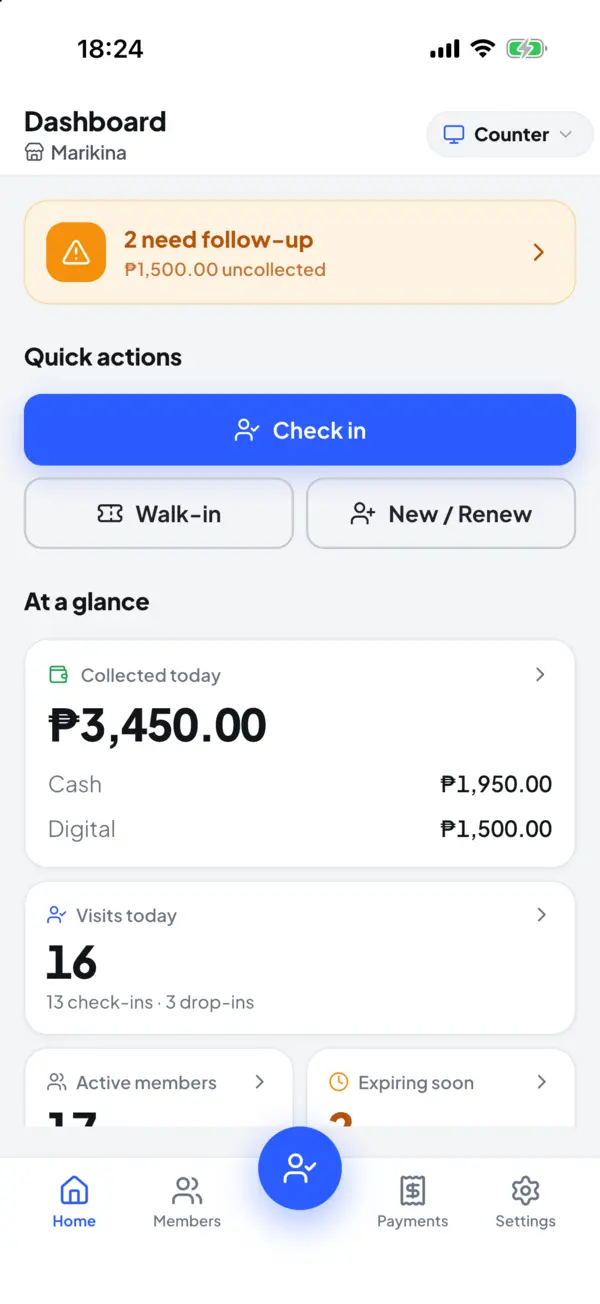
Gymmers runs your front desk on one phone: check-ins, memberships, payments and the end-of-shift cash count. It keeps working when the internet doesn’t.
Gymmers is free for now. Every Pro feature. No payment details needed. For iPhone and Android.
- Works offline
- Cash, GCash, Maya, QR Ph
- Unlimited members on every plan
See a day at the counter
With sound. The transcript is below.
Read the transcript
Every gym counter runs on the same daily work: attendance, memberships, payments. Gymmers keeps it all in one place.
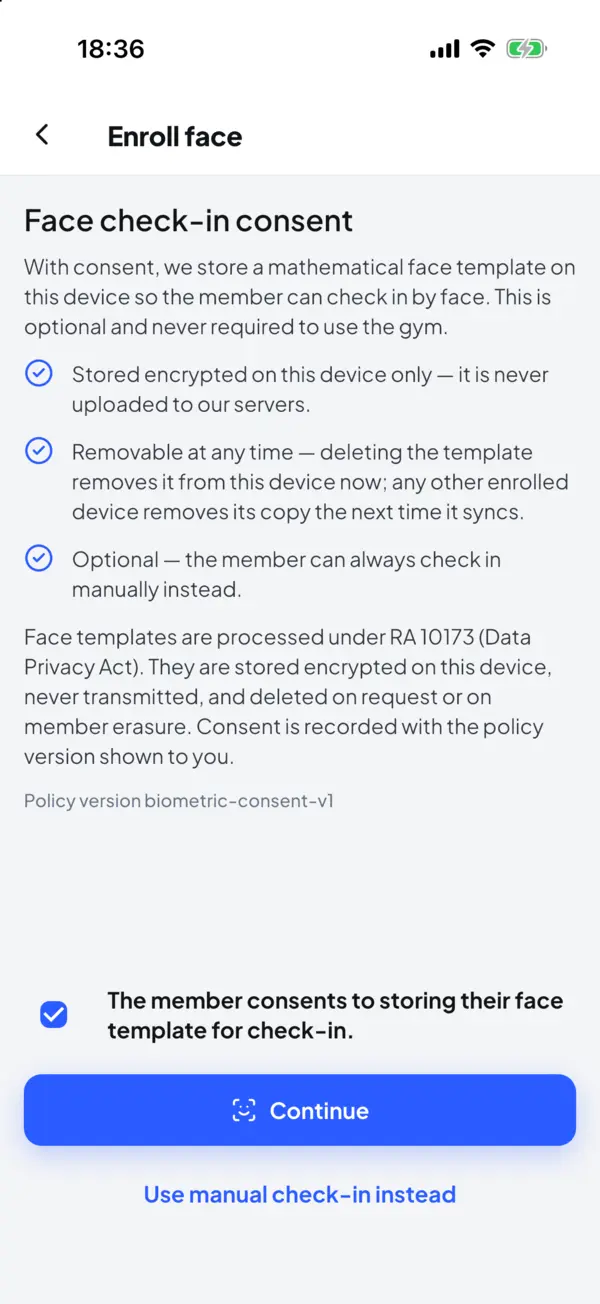
Members enrolled on this phone can check in by face. It’s optional, and encrypted on the device. Staff confirm, and the visit is recorded. Others can show their QR card. One scan, one tap to confirm, and they’re in. Or just search by name, even when you’re offline. Check them in, and their remaining sessions update right away.
Member not in Gymmers yet? Add them while they’re at the counter. Bring over their existing membership and prior payments, then check them in.
Renewals take a few taps. Eligible discounts are already on file, so the right total is ready, and the payment is recorded with a receipt. Outstanding balances are easy to spot on the member’s profile. Paid by GCash? Attach the transfer screenshot as proof. It stays with the payment, so owners and managers can check it later. Walk-ins? Charge the drop-in fee, and you’re done.
At the end of the shift, staff count the cash box. Gymmers compares it with this device’s estimate, and saves the count. Today’s collections, cash and digital, in one view. And owners can review collections from anywhere, day by day.
Plus bulk member import, staff roles, branches, reports, and more. With more on the way. Gymmers. Your gym, easier to manage. Get started at gymmers.app.
One evening rush at the front desk
Scroll through a shift, from the first check-in to the cash count. Every screen is from the Gymmers app.
-
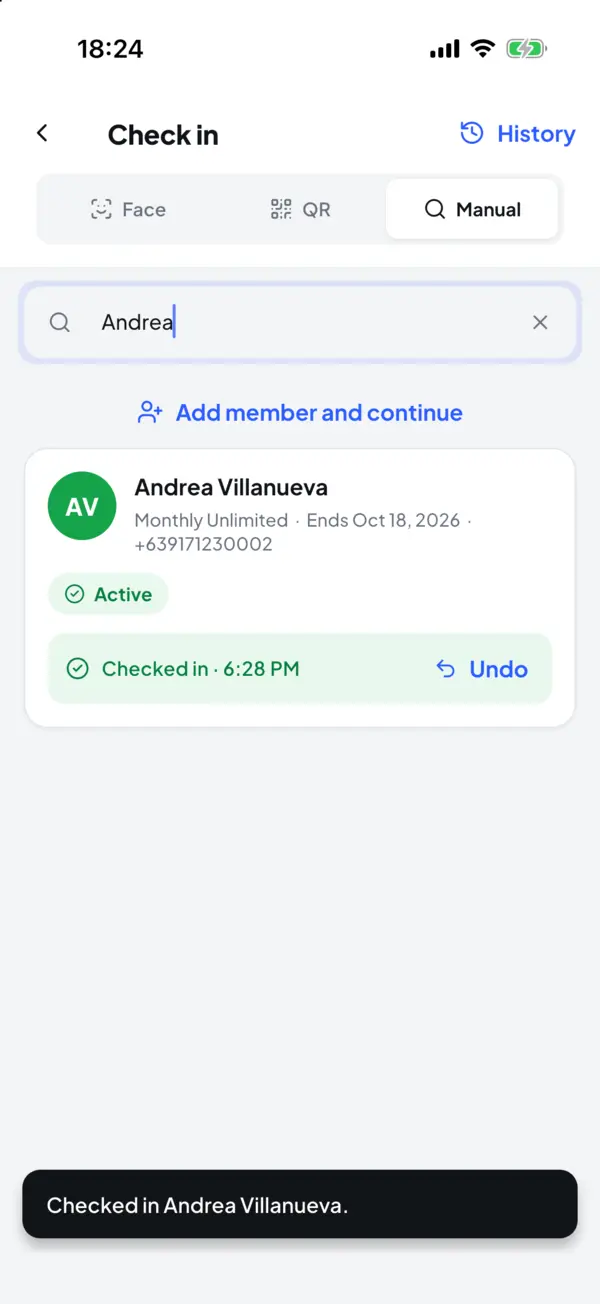
Step 1 of 66:28 PM
Check members in
By face (if the member agreed), QR card or a name search. One tap to confirm, and session packs count down right away.
Andrea Villanueva checked in
-
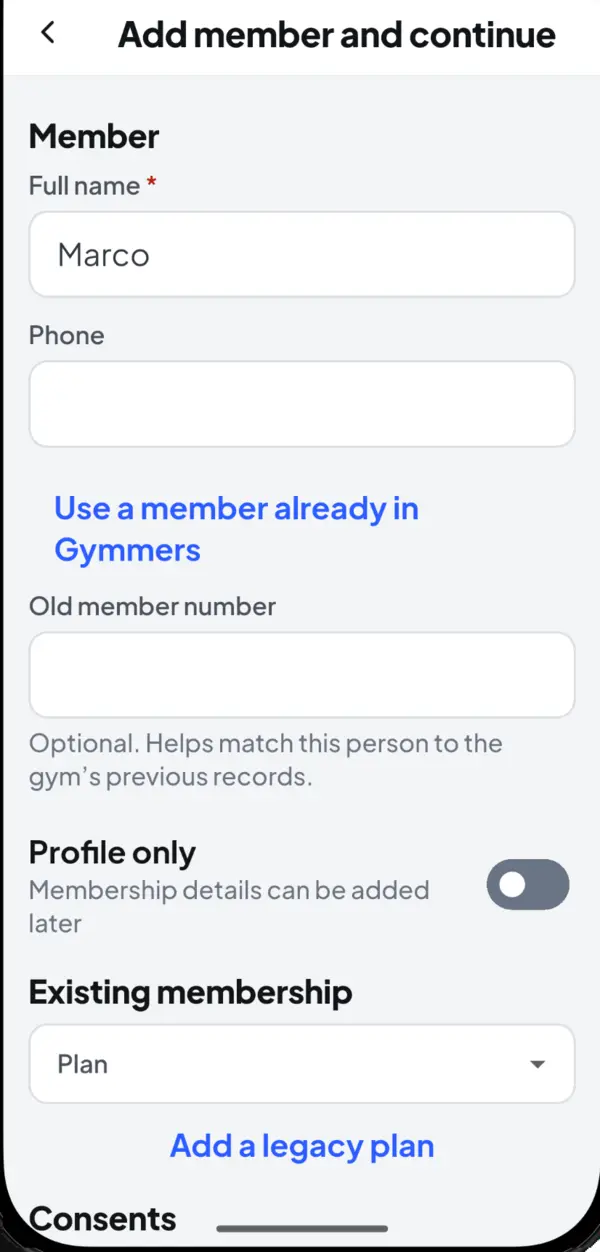
Step 2 of 66:29 PM
Add a new member
Marco isn’t in Gymmers yet. Add him at the counter, bring over the membership he already has, then check him in.
Marco added and checked in
-
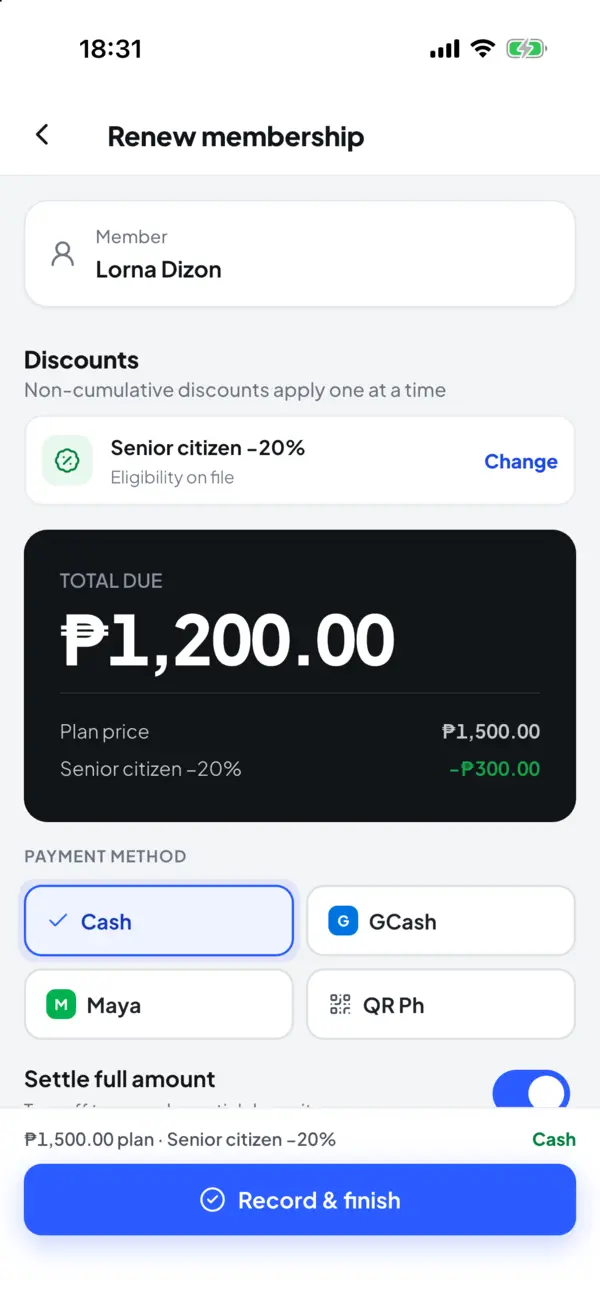
Step 3 of 66:31 PM
Renew with the senior discount
Lorna’s 20% senior discount is already on file, so the total comes out right: ₱1,200.00 instead of ₱1,500.00. Every payment gets a receipt.
Renewal · ₱1,200.00 cash
-
Step 4 of 66:32 PM
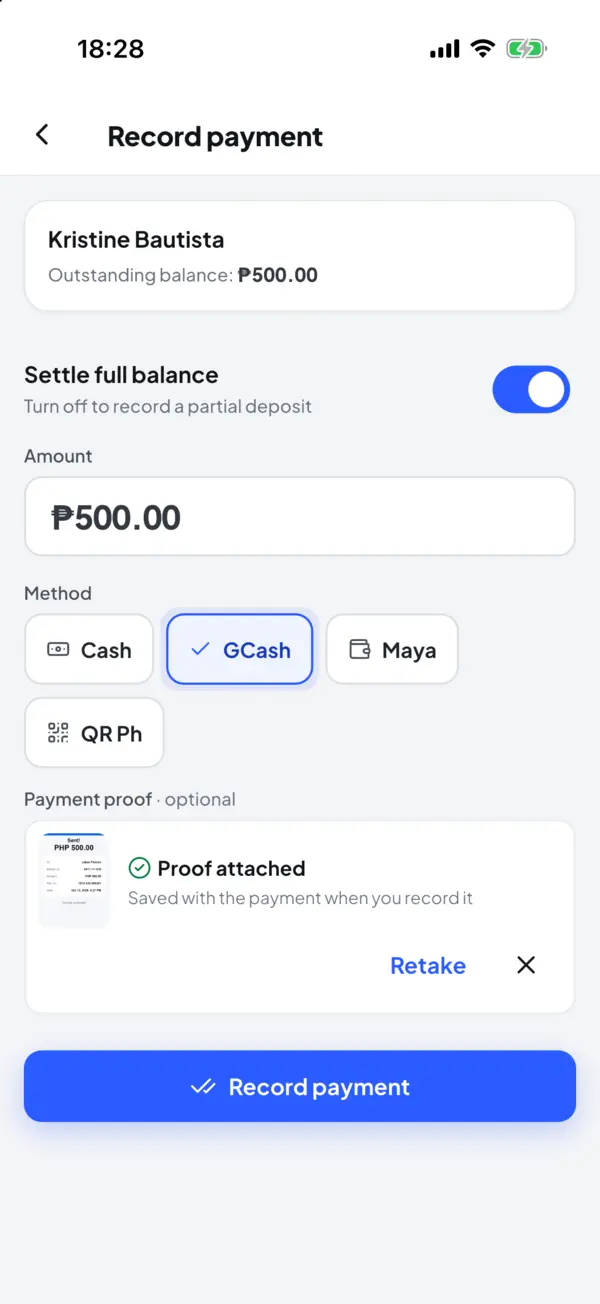
Record GCash with proof
Kristine pays her ₱500.00 balance by GCash. Attach her transfer screenshot. It stays with the payment, so you can check it later.
₱500.00 GCash · proof attached
-
Step 5 of 66:33 PM
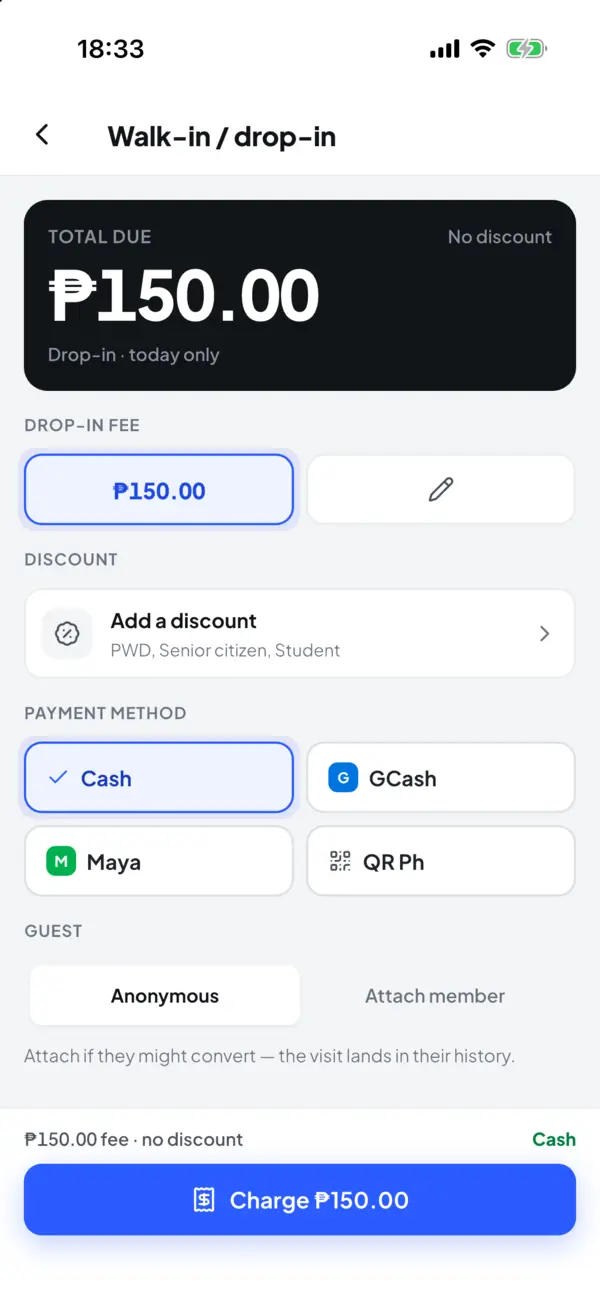
Charge a walk-in
A drop-in at the door. Charge the ₱150.00 fee in one step and you’re done. Day passes work too.
Walk-in · ₱150.00 cash
-
Step 6 of 6End of shift
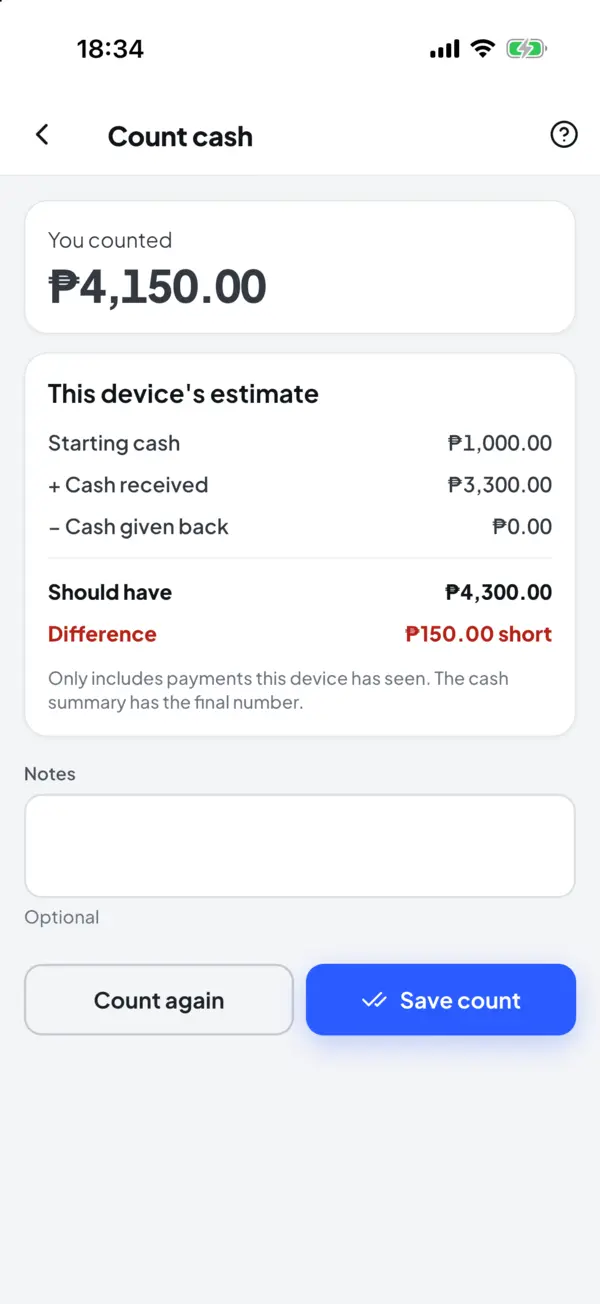
Count the cash box
Staff count the cash. Gymmers adds the starting cash to the cash received, shows if the count is short and saves it.
₱150.00 short · count saved
That’s a shift. Ready to run yours this way?
Get started freePartial payments. Unpaid balances show on the member’s profile and on a follow-up list.
Members pay you directly. Cash, GCash, Maya or QR Ph, as they do now. Staff record each payment in Gymmers.
A receipt for every payment. Renewals, walk-ins and balance payments alike.
Works without internet
Check-ins, sales and payments still work with no signal. Gymmers saves them on the phone and sends them when the connection is back.
Staff can still find members by name, and session packs still count down at check-in.
Back online · all 3 changes sent
Know how the day went, from anywhere
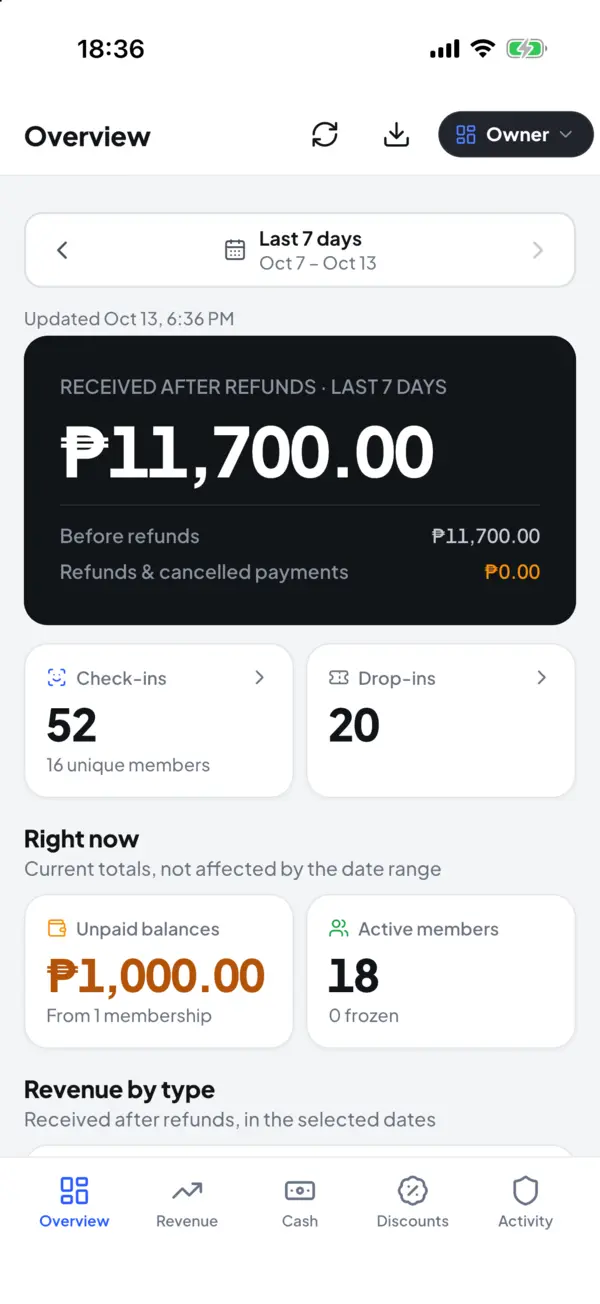
Collections
Today’s collections, cash and digital, in one view. Check any day’s collections from anywhere.
Reports
Revenue, cash, unpaid balances, refunds and cancelled payments, a visit log, and a log of who did what. Export to CSV.
Staff roles
Owner, manager and front desk accounts. Front desk can’t give refunds, cancel payments or forgive balances.
Branches and import
Run more than one branch on Pro. Bring your whole member list in with a bulk import.
Only your check-in phones can read face data
Face check-in is optional
Staff enroll only members who agree. Their face data is encrypted, and only the check-in phones you approve can read it.
Consent on record
Gymmers records each member’s consent, and you can erase a member’s data when they ask, as RA 10173 requires.
Encrypted on the phone
Gymmers encrypts the member and payment records it keeps on the counter phone.
Free for now
Gymmers is free for now. Every gym gets the whole app, with every Pro feature and up to 50 branches, at no cost. No card or payment details needed.
Everything included
Core and Pro features, with unlimited members and staff accounts
At the counter
- Check-in by face, QR card or name
- Works without internet
- Walk-ins and day passes
- Bulk member import
Payments and cash
- Renewals with discounts on file, and receipts
- Record cash, GCash, Maya and QR Ph, with proof
- Partial payments, balances and follow-up list
- End-of-shift cash count
Owner reports
- Collections and reports, with CSV export
- Attendance trends
- Members not seen lately
- Discount analysis
- Branch comparison
Staff, branches and privacy
- Staff roles and activity log
- Privacy tools (RA 10173)
- More than one branch
Before paid plans start, we'll tell every gym owner at least 30 days ahead, by email. Nobody is charged unless they choose a plan.
Questions owners ask
Something else? Visit Help or message us on Facebook .
Do I need internet at the counter?
No. Check-ins, sales and payments keep working without internet. Gymmers sends them when the connection is back.
Does Gymmers collect payments from my members?
No. Your members pay you the way they do now: cash, GCash, Maya or QR Ph. Your staff record each payment in Gymmers, and can attach a transfer screenshot as proof.
Do members have to use face check-in?
No, it’s optional. A member has to agree first. Their face data is encrypted, and only the check-in phones you approve can read it, not even Gymmers. Members can check in with their QR card instead, or your staff can search by name.
Can I bring over my current members?
Yes. Import your member list in bulk, or add members at the counter with their existing membership and past payments.
Is Gymmers really free?
Gymmers is free for now. Every gym gets the whole app, with every Pro feature and up to 50 branches, at no cost. No card or payment details needed.
Will I be charged later?
Before paid plans start, we'll tell every gym owner at least 30 days ahead, by email. Nobody is charged unless they choose a plan.
Do I need a card?
No. Create your gym and use every feature without a card or any payment details.
Gymmers is free for now.
Create your gym in the app. No payment details needed.